

You know what’s frustrating? Searching for the service you offer in your own town and seeing everyone else’s business pop up.
Meanwhile, you’re sitting there thinking, “Hello? I do that, too.” 👋
You’ve got a website. You’re posting on Facebook when you can. You’re doing good work and taking care of your customers. So why is it still so hard for new people to find you?
That’s where local SEO comes in.
And before your eyes glaze over at another marketing term, stay with me. This is about helping people in your area find your business when they’re already looking for what you offer.
Let’s talk about where to start.
Local SEO means improving your online presence so your business can show up in relevant local searches.
Think about searches like:
The person searching usually has a reason. They need flowers delivered, their roof is leaking, or their shoulders have officially had enough.
You want your business to be an option when that happens.
Google says local results depend mainly on relevance, distance, and prominence—how well your business matches the search, how close it is, and how well known it is. You can’t control where someone searches from, but you can make your business information clearer and more useful.
Here are five places I’d start.
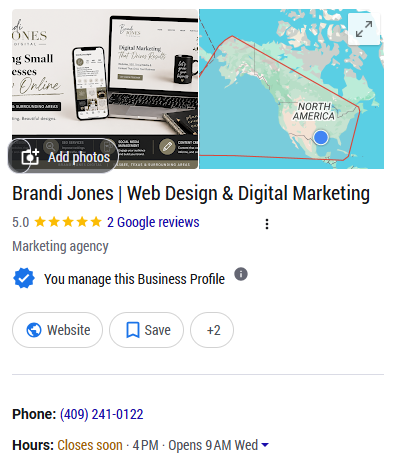
If you created your Google Business Profile a few years ago and haven’t looked at it since, consider this your friendly reminder to check on it.
Are your hours still right? Does the website link work? Are the photos showing what your business looks like today?
Someone may find this profile before they ever visit your website. Give them enough information to decide whether to call, visit, or learn more.
Start with:
Complete, accurate information helps Google understand your business and helps customers know what to expect.
You can also share helpful updates, offers, or announcements. Just don’t treat posting every week like a secret password to the top of Google.
Work from home? Here’s where it gets a little confusing.
You don’t necessarily need a storefront to have a Google Business Profile. What matters is how you work with your customers.
If you run your business from home but travel to customers to provide services—like a house cleaner, photographer, or home organizer—you may qualify as a service-area business. If customers don’t visit your home, your home address should stay hidden on your profile.
If you serve customers entirely through email, phone calls, or video meetings, Google considers your business online-only. Those businesses aren’t eligible for a Google Business Profile, even if their customers live nearby.
So, working from home isn’t what determines whether you qualify. The difference is whether you provide services to customers in person.
And if your business doesn’t qualify, you can still work on getting found locally through your website. Helpful service pages and clear information about the areas you serve give you somewhere to start.
Your website can have beautiful photos, the perfect colors, and a headline that sounds lovely.
But can someone tell what you offer and where you work?
“Making your everyday moments special” could describe a florist, a photographer, or someone selling really good cupcakes.
“Fresh flower delivery in Silsbee, Texas” gives a potential customer something they can use.
You don’t have to give up your personality. Just make room for the details.
Look at your homepage and main service pages. Do they clearly explain:
For example, a contractor might say:
“We build custom patios and outdoor covers for homeowners in Vidor, Beaumont, and surrounding Southeast Texas communities.”
Now someone knows what you build and whether you work in their area. They can head over to your services, look through your projects, or ask for an estimate.
You don’t need to squeeze your city into every sentence. Mention your location where it makes sense, and keep the wording natural. You’re still talking to people who want to know if you can help them.
If you serve several cities, separate location pages may make sense.
The key is giving each page a reason to exist.
Someone looking for a contractor in Lumberton wants to know whether you work there, what projects you take on, and how to get an estimate. They probably don’t need three paragraphs explaining that Lumberton is a wonderful place to live.
A helpful location page could include:
You don’t need an office in every city you serve. These pages help people understand that you’re available in their area and what working with you would look like.
But creating a bunch of pages with the same wording and swapping out the city name doesn’t give visitors much useful information.
Start with the areas that matter most to your business. Give each page helpful details that answer someone’s questions and make it easy to get in touch.
You finish a project. The customer is happy. They tell you how much they appreciate your work.
You say thank you, wrap things up, and move on to the next thing.
Then, three weeks later, you remember you meant to ask for a review.
Sound familiar?
Make the request part of your usual follow-up while the experience is still fresh. It can be as simple as:
“Thank you again for choosing my business! If you have a minute, I’d really appreciate an honest Google review. Here’s the link to make it easy.”
No big speech needed.
Google reviews can help with your local SEO, too. Google says the number of reviews and positive ratings can help your business rank in local search results. So those reviews can help people find you, while also giving them a little more confidence about reaching out.
Let customers describe their experience in their own words. You don’t need to hand them a list of keywords or ask them to squeeze your city into the review.
When someone takes the time to leave a review, respond thoughtfully. A quick, personal thank-you feels a lot better than the exact same reply pasted under every review. It also shows potential customers that you pay attention and appreciate the people who choose your business.
This is the part that’s easy to put off because, honestly, most business owners have enough tabs open already.
But your website needs a little attention behind the scenes, too.
A few useful things to check:
A sitemap helps Google discover pages, but it doesn’t guarantee they’ll appear in search results.
Google Analytics can also help you understand what visitors do once they arrive. Installing it won’t improve your rankings by itself, but it can help you see whether people are reaching the pages and taking the actions that matter to your business.
You don’t have to become the person who knows how to fix all of this. It helps to know what to ask whoever takes care of your website.
Please don’t read this and decide you need to spend your entire weekend fixing your online presence.
Pick one manageable task:
Choose something you can finish. Then work on the next thing.
There isn’t one timeline that applies to every business. Your competition, website, current visibility, and the changes needed all play a part.
Google may take days or weeks just to recrawl a page, and a recrawl doesn’t guarantee a ranking improvement. Give the work time and track progress instead of expecting a next-day result.
You can explain the areas you serve on your website without having a storefront in each one.
Google Business Profile has separate eligibility rules. A business that visits customers may qualify, while an online-only business does not.
No one can honestly promise you that.
A clear, useful website and an accurate Business Profile give you a stronger starting point, but rankings also depend on factors outside your control. Google specifically says you can’t request or pay for a better local ranking.
You’re already busy running your business. Finding time to sort through website settings, service pages, and Google Business Profile updates can end up on that “I’ll get to it eventually” list.
I can help with that.
At Brandi Jones Digital, I help small businesses with website design, local SEO, Google Business Profiles, and ongoing website support.
If you’re wondering why your business is hard to find online, send me a message. Let’s take a look at what you have and figure out what needs attention first.
Welcome to the blog! Glad you’re here. 😊 Let’s talk websites, SEO, social media,
and simple ways to help your business
show up online—without adding more
stress to your plate.